firehol-nat(5)
💅 firehol-nat — set up NAT and port redirections 🦋
okay bestie, buckle UP, because this is firehol-nat(5) from the FireHOL 3.1.8 era, and it's all about NAT and port redirections. it's giving network-goddess energy. let's go 💖
✨ NAME ✨
firehol-nat — set up NAT and port redirections
🌸 SYNOPSIS 🌸
{ nat to-destination | dnat [to] } ipaddr[:port] [random] [persistent] [id id] [at chain] [rule-params]

{ nat to-source | snat [to] } ipaddr[:port] [random] [persistent] [id id] [at chain] [rule-params]

{ nat redirect-to | redirect [to] } port[-range] [random] [id id] [at chain] [rule-params]
👑 DESCRIPTION 👑
okay so here's the tea: Destination NAT is literally provided by nat to-destination and its synonym dnat. 💫
Source NAT? that's nat to-source and its synonym snat.
And Redirection to a port on the local host? that's nat redirect-to and its synonym redirect. 🎀
The port part of the new address is optional with SNAT and DNAT — if you don't specify it, it just will not be changed. no drama.
When you apply NAT to a packet, the Linux kernel will track the changes it makes, so that when it sees replies the transformation will be applied in the opposite direction. fr fr. For instance if you changed the destination port of a packet from 80 to 8080, when a reply comes back, its source is set as 80. This means the original sender is not aware a transformation is happening. 🤯 sneaky but iconic.
This means that NAT is only applied on the first packet of each connection — the nat FireHOL helper always appends state NEW to NAT statements. periodt.
The NAT helper can be used to setup load balancing. Check the section BALANCING below. 👀
Note 💀 Therule-paramsare used only to determine the traffic that will be matched for NAT in these commands, not to permit traffic to flow. Applying NAT does not automatically create rules to allow the traffic to pass. You will still need to includeclientorserverentries in an interface or router to allow the traffic. like, NAT is not a permission slip bestie. When usingdnatorredirect, the transformation is in thePREROUTINGchain of the NAT table and happens before normal rules are matched, so yourclientorserverrule should match the “modified” traffic. When usingsnat, the transformation is in thePOSTROUTINGchain of the NAT table and happens after normal rules are matched, so yourclientorserverrule should match the “unmodified” traffic. See thehttp://upload.wikimedia.org/wikipedia/commons/3/37/Netfilter-packet-flow.svgnetfilter flow diagram if you would like to see how network packets are processed by the kernel in detail. 🧚
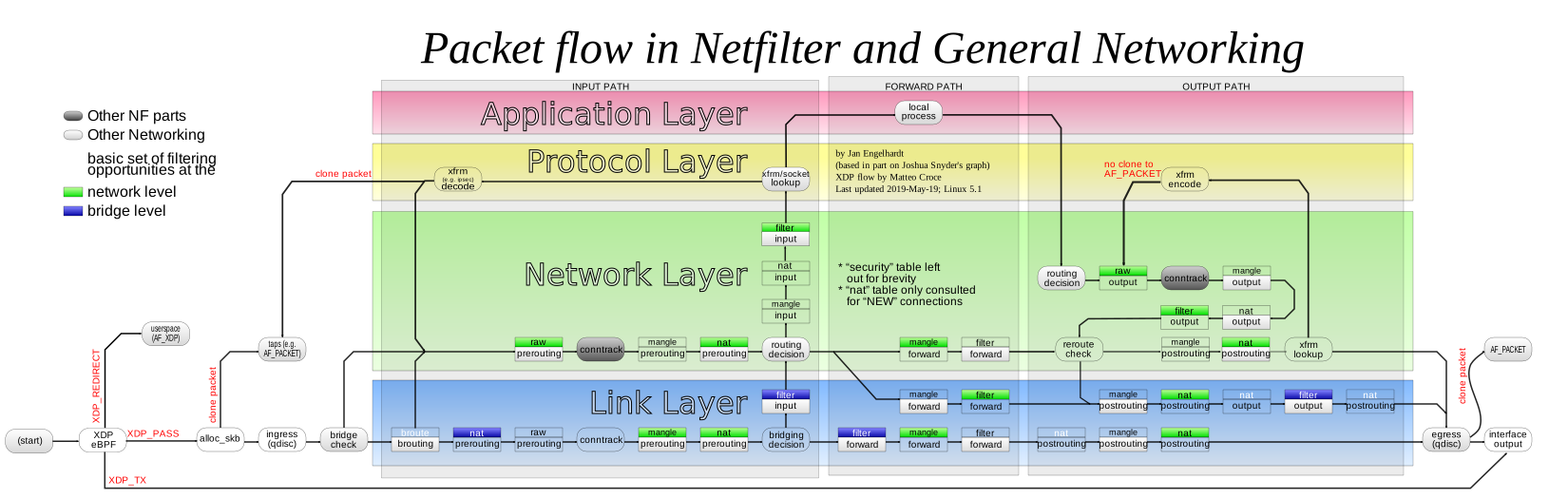
The at keyword allows setting a different chain to attach the rules. For dnat and redirect the default is PREROUTING, but OUTPUT is also supported. For snat the default is POSTROUTING, but INPUT is also supported. mix and match, she contains multitudes 💅
random will randomise the port mapping involved, to ensure the ports used are not predictable. 🔥
persistent is used when the statement is given alternatives (i.e. many destination servers for dnat, many source IPs for snat, many ports for redirect). It will attempt to keep each client on the same nat map. See below for more information about persistence. 🫶
The nat helper takes one of the following sub-commands:
🎀 to-destination ipaddr[:port] 🎀
Defines a Destination NAT (DNAT). Commonly thought of as port-forwarding (where packets destined for the firewall with a given port and protocol are sent to a different IP address and possibly port), DNAT is much more flexible in that any number of parameters can be matched before the destination information is rewritten. it's giving ✨options✨
ipaddr[:port] is the destination address to be set in packets matching rule-params.
If no rules are given, all forwarded traffic will be matched. outface should not be used in DNAT since the information is not available at the time the decision is made. 🚫
ipaddr[:port] accepts any --to-destination values that iptables(8) accepts. Run iptables -j DNAT --help for more information. Multiple ipaddr[:port] may be specified by separating with spaces and enclosing with quotes. 🦋
🌈 to-source ipaddr[:port] 🌈
Defines a Source NAT (SNAT). SNAT is similar to masquerading but is more efficient for static IP addresses. You can use it to give a public IP address to a host which does not have one behind the firewall. See also firehol-masquerade(5). 💜
ipaddr[:port] is the source address to be set in packets matching rule-params.
If no rules are given, all forwarded traffic will be matched. inface should not be used in SNAT since the information is not available at the time the decision is made. 🚫
ipaddr[:port] accepts any --to-source values that iptables(8) accepts. Run iptables -j SNAT --help for more information. Multiple ipaddr[:port] may be specified by separating with spaces and enclosing with quotes. ⭐
🍓 redirect-to port[-range] 🍓
Redirect matching traffic to the local machine. This is typically useful if you want to intercept some traffic and process it on the local machine. main character energy, honestly 👑
port[-range] is the port range (from-to) or single port that packets matching rule-params will be redirected to.
If no rules are given, all forwarded traffic will be matched. outface should not be used in REDIRECT since the information is not available at the time the decision is made. 🚫
💖 BALANCING 💖
okay so here's the tea: NAT can balance multiple servers (or multiple IPs, if we're talking snat) whenever you hand it a range. And bestie, this part? It's the kernel doing the work, not FireHOL. No cap.
Example:
dnat4 to 10.0.0.1-10.0.0.10 persistent proto tcp dst 1.1.1.1 dport 80In that little cutie up there, the Linux kernel gives a persistent server to all the sockets of any single client. Same client, same server, every time. Loyalty. 🫶
FireHOL can also set up balancing using a round-robin or weighted average distribution of requests. BUT — and this is the important part, so listen — persistent cannot be used with that. Why? Because the Linux kernel applies persistence on a single NAT statement. That's just the rules, babes. 💅
Round Robin distribution 🔄
To turn on round robin distribution, give multiple to values, either space separated and wrapped in quotes, or comma separated. Both work, pick your fave.
Example:
dnat4 to 10.0.0.1,10.0.0.2,10.0.0.3 proto tcp dst 1.1.1.1 port 80
# or
dnat4 to "10.0.0.1 10.0.0.2 10.0.0.3" proto tcp dst 1.1.1.1 port 80
Ports can also be given per IP, and yes she's flexible like that:
dnat4 to 10.0.0.1:70,10.0.0.2:80,10.0.0.3:90 proto tcp dst 1.1.1.1 port 80
# or
dnat4 to "10.0.0.1:70 10.0.0.2:80 10.0.0.3:90" proto tcp dst 1.1.1.1 port 80
Weighted distribution ⚖️
Want some servers to carry more of the load? Main character servers? Say less. To enable weighted distribution, just append a slash plus the weight you're requesting for each entry.
FireHOL adds up all the weights you gave and calculates the percentage of traffic each entry should receive. Math but make it fashion. ✨
Example:
dnat4 to 10.0.0.1/30,10.0.0.2/30,10.0.0.3/40 proto tcp dst 1.1.1.1 port 80
# or
dnat4 to "10.0.0.1/30 10.0.0.2/30 10.0.0.3/40" proto tcp dst 1.1.1.1 port 80
# or
dnat4 to 10.0.0.1:70/30,10.0.0.2:80/30,10.0.0.3:90/40 proto tcp dst 1.1.1.1 port 80
# or
dnat4 to "10.0.0.1:70/30 10.0.0.2:80/30 10.0.0.3:90/40" proto tcp dst 1.1.1.1 port 80
PERSISTENCE 💀
okay so the kernel only supports persistence if the NAT alternatives are contiguous — like dnat to A-B, snat to A-B, redirect to 1000:1010, etc. If they are contiguous, persistence stays with the kernel and FireHOL does nothing. Zero notes, she's not even in the group chat.
If the alternatives are not contiguous, FireHOL steps in and uses the recent iptables module to apply persistence all by itself. Girlboss behavior.
FireHOL also supports mixed mode persistence. For example, you can have something like this:
dnat to A-B/70,C-D/20,F/10 persistence id mybalancerThe above is a weighted distribution of persistence. Group A-B gets 70%, C-D gets 20%, and server F gets 10%. 💅
With all that, FireHOL applies its persistence to pick one of the groups A-B, or C-D, or F. Once the group has been picked by FireHOL, the kernel applies persistence within the group, to pick the server that will actually handle the request. Two-step, teamwork, iconic.
The FireHOL persistence works like this:
- A packet is received that should be NATed.
- A lookup is made using the
recentmodule to find if it has been seen before. The source IP of the packet is looked up. - If it has been seen before, the connection is mapped the same way it was the last time. The
recentmodule is updated too. - If it has not been seen before, the connection is mapped using the distribution method specified. The
recentmodule is updated too, so it's ready for the next connection.
The recent module has a few limitations, and bestie, we're gonna talk about all of them:
- It has lookup tables. We need one lookup table for each member of the NAT. FireHOL uses the
idparameter and the definition of each alternative in the NAT statement to form a name for the lookup table. These lookup tables are persistent to firewall restarts, which is exactly why FireHOL requires you to set anid. - It can keep entries in its lookup tables for a given time. FireHOL sets this to
3600seconds. You can control it by settingFIREHOL_NAT_PERSISTENCE_SECONDS. - It has a limit on the number of entries in the lookup tables. FireHOL cannot set this. This is a kernel module option. The default is
200entries.
Check this:
# modinfo xt_recent
filename:       /lib/modules/4.1.12-gentoo/kernel/net/netfilter/xt_recent.ko
alias:          ip6t_recent
alias:          ipt_recent
license:        GPL
description:    Xtables: "recently-seen" host matching
author:         Jan Engelhardt <jengelh@medozas.de>
author:         Patrick McHardy <kaber@trash.net>
depends:        x_tables
intree:         Y
vermagic:       4.1.12-gentoo SMP preempt mod_unload modversions
parm:           ip_list_tot:number of IPs to remember per list (uint)
parm:           ip_list_hash_size:size of hash table used to look up IPs (uint)
parm:           ip_list_perms:permissions on /proc/net/xt_recent/* files (uint)
parm:           ip_list_uid:default owner of /proc/net/xt_recent/* files (uint)
parm:           ip_list_gid:default owning group of /proc/net/xt_recent/* files (uint)
parm:           ip_pkt_list_tot:number of packets per IP address to remember (max. 255) (uint)
You have to consult your distribution documentation to set these. You can find their current values by examining the files found in /sys/module/xt_recent/parameters/. Unfortunately, those files are not writable, so to change parameters you have to unload and reload the module (i.e. apply a firewall that does not use the recent module, rmmod xt_recent, change the parameter, re-apply a firewall that uses the recent module). Annoying? yes. Doable? also yes. 🙈
Normally, you will need a line in /etc/modprobe.d/netfitler.conf like this:
options xt_recent ip_list_tot=16384The number 16384 used there is the max number of unique client IPs expected to be had per hour (FIREHOL_NAT_PERSISTENCE_SECONDS) for this service.
ip_list_hash_size is calculated by the kernel when the module is loaded, to be bigger and up to twice ip_list_tot.
Once you have the balancer running, you can find its lookup tables in /proc/net/xt_recent/. There you'll find files starting with the id parameter — one file for every alternative of the NAT rule. Cute little family of files. 🎀
🌈 EXAMPLES 🌈
# Port forwarding HTTP
dnat4 to 192.0.2.2 proto tcp dport 80

# Port forwarding HTTPS on to a different port internally
dnat4 to 192.0.2.2:4443 proto tcp dport 443

# Fix source for traffic leaving the firewall via eth0 with private address
snat4 to 198.51.100.1 outface eth0 src 192.168.0.0/24

# Transparent squid (running on the firewall) for some hosts
redirect4 to 8080 inface eth0 src 198.51.100.0/24 proto tcp dport 80

# Send to 192.0.2.1
#  - all traffic arriving at or passing through the firewall
nat4 to-destination 192.0.2.1

# Send to 192.0.2.1
#  - all traffic arriving at or passing through the firewall
#  - which WAS going to 203.0.113.1
nat4 to-destination 192.0.2.1 dst 203.0.113.1

# Send to 192.0.2.1
#  - TCP traffic arriving at or passing through the firewall
#  - which WAS going to 203.0.113.1
nat4 to-destination 192.0.2.1 proto tcp dst 203.0.113.1

# Send to 192.0.2.1
#  - TCP traffic arriving at or passing through the firewall
#  - which WAS going to 203.0.113.1, port 25
nat4 to-destination 192.0.2.1 proto tcp dport 25 dst 203.0.113.1
👀 SEE ALSO 👀
firehol(1)— FireHOL programfirehol.conf(5)— FireHOL configurationfirehol-interface(5)— interface definitionfirehol-router(5)— router definitionfirehol-params(5)— optional rule parametersfirehol-masquerade(5)— masquerade helper- FireHOL Website
- FireHOL Online PDF Manual
- FireHOL Online Documentation
- NAT HOWTO
http://upload.wikimedia.org/wikipedia/commons/3/37/Netfilter-packet-flow.svgnetfilter flow diagram
💜 AUTHORS 💜
FireHOL Team.
and that's the whole page bestie, we ate and left no crumbs 👑 this lil FireHOL Reference was built 13 Apr 2025 and lives under firehol-nat(5) — go forth and NAT responsibly, mwah 💅🌸
📦 where this page comes from
- debian trixie: firehol-doc 3.1.8+ds-1 · GPL-2.0-or-later
- ubuntu resolute: firehol-doc 3.1.8+ds-1 · GPL-2.0-or-later
- ubuntu stonking: firehol-doc 3.1.8+ds-1 · GPL-2.0-or-later
- 💖 girlified by deepseek-ai/DeepSeek-V4.1-Flash on : a language model's rewrite of the original, under its terms