firehol-ipset(5)
🌸 firehol-ipset(5) — the ipset bestie manual 💅
ok so this is the firehol-ipset page from the FireHOL manual, section 5, version 3.1.8 (iykyk) ✨
✨ NAME ✨
firehol-ipset — configure ipsets 🎀
✨ SYNOPSIS ✨
ipset command name options✨ DESCRIPTION ✨
okay so bestie, FireHOL ships with an ipset helper 💖. It's a lil wrapper around the actual real-life ipset command, and FireHOL handles it internally in a way that's honestly so smart — the ipset collections you define in your config get activated before the firewall itself gets activated. no cap, ordering matters and FireHOL knows it 👑
FireHOL is also smart enough to restore the ipsets after a reboot, and it does that before it restores the firewall, so everything just works as seamlessly as possible. like, the vibes are immaculate 🌈
The ipset helper uses the exact same syntax as the real ipset command. So in FireHOL you literally just drop in the ipset statements you need, and FireHOL does the rest. periodt 🫶
Keep in mind that each ipset collection is either IPv4 or IPv6 — it's giving binary, no in-between. In FireHOL you prefix ipset with either ipv4 or ipv6 and FireHOL will pick the right IP version for you (there's also ipset4 and ipset6, because of course there is 💅).
Also, do not add-!toipsetstatements given infirehol.conf. FireHOL will batch import all ipsets and this option is not needed. just… don't, bestie 🙈
🌸 FireHOL ipset extensions 🌸
The features below are extensions of ipset that can only be used from within firehol.conf. They will not work on a terminal. sorry to the terminal girlies 😭
The FireHOL helper allows mass import of ipset collections from files. This is done with the ipset addfile command 🔥
The ipset addfile command will get a filename, remove all comments (anything after a # on the same line), trim any empty lines and spaces, and add all the remaining lines to ipset, as if each line of the file was run with:
ipset add COLLECTION_NAME IP_FROM_FILE [other options]The syntax of the ipset addfile command is:
ipset addfile *name* [ip|net] *filename* [*other ipset add options*]nameis the collection to add the IPs. 👑ipis optional and will select all the lines of the file that do not contain a/.netis optional and will select all the lines of the file that do contain a/.filenameis the filename to read. You can give absolute filenames and relative filenames (relative to/etc/firehol).other ipset add optionsis whatever elseipset addsupports, that you are willing to give for each line.
The ipset add command implemented in FireHOL also allows you to give multiple IPs separated by comma, or enclosed in quotes and separated by space. iconic behavior tbh 💜
✨ EXAMPLES ✨
ipv4 ipset create badguys hash:ip
ipv4 ipset add badguys 1.2.3.4
ipv4 ipset addfile badguys file-with-the-bad-guys-ips.txt
...
ipv4 blacklist full ipset:badguys

# example with multiple IPs
ipv4 ipset create badguys hash:ip
ipv4 ipset add badguys 1.2.3.4,5.6.7.8,9.10.11.12 # << comma separated
ipv4 ipset add badguys "11.22.33.44 55.66.77.88"  # << space separated in quotes
ipsets with IP Lists for abuse, malware, attacks, proxies, anonymizers, etc can be downloaded with the contrib/update-ipsets.sh script 🦋 Information about the supported ipsets can be found at FireHOL IP Lists ⭐
✨ SEE ALSO ✨
firehol(1)— FireHOL programfirehol.conf(5)— FireHOL configurationfirehol-interface(5)— interface definitionfirehol-router(5)— router definitionfirehol-params(5)— optional rule parametersfirehol-masquerade(5)— masquerade helper- FireHOL Website
- FireHOL Online PDF Manual
- FireHOL Online Documentation
- FireHOL IP Lists
- NAT HOWTO
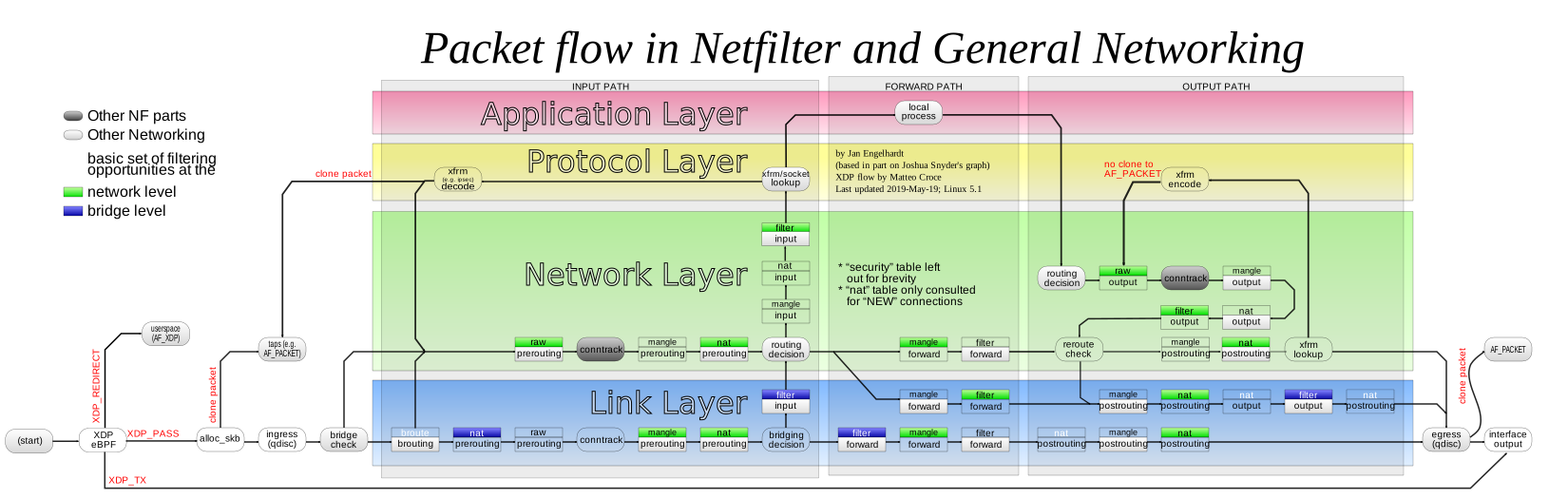
http://upload.wikimedia.org/wikipedia/commons/3/37/Netfilter-packet-flow.svgnetfilter flow diagram
✨ AUTHORS ✨
FireHOL Team. 🫶 (yes, all of them, collectively, as a unit 💖)
ok that's the whole page bestie, you're welcome 😌✨ this was built 13 Apr 2025 as part of the FireHOL Reference, for firehol-ipset(5) in version 3.1.8 — go configure those ipsets, you've got this, mwah 💅🎀🌸
📦 where this page comes from
- debian trixie: firehol-doc 3.1.8+ds-1 · GPL-2.0-or-later
- ubuntu resolute: firehol-doc 3.1.8+ds-1 · GPL-2.0-or-later
- ubuntu stonking: firehol-doc 3.1.8+ds-1 · GPL-2.0-or-later
- 💖 girlified by deepseek-ai/DeepSeek-V4.1-Flash on : a language model's rewrite of the original, under its terms