Long(3)
🫶 Long(3) — User Contributed Perl Documentation 🫶
Okay bestie, welcome to Long(3) from User Contributed Perl Documentation. This is the manual for Getopt::GUI::Long, and it's giving glow-up energy for your command-line tools. ✨
💖 NAME 💖
Getopt::GUI::Long — that's the whole name, periodt. 👑
✨ SYNOPSIS ✨
Here's the vibe. You use it like this:
use Getopt::GUI::Long;

# pass useful config options to Configure
Getopt::GUI::Long::Configure(qw(display_help no_ignore_case capture_output));
GetOptions(\%opts,
           ["GUI:separator",   "Important Flags:"],
           ["f|some-flag=s",   "A flag based on a string"],
           ["o|other-flag",    "A boloean"],
          );

# or use references instead of a hash (less tested, however):

GetOptions(["some-flag=s",  "perform some flag based on a value"] => \$flag,
           ["other-flag=s", "perform some flag based on a value"] => \$other);

# displays auto-help given the input above:

% opttest -h
Usage: opttest [OPTIONS] Other Arguments

OPTIONS:

Important Flags:
   -f STRING             A flag based on a string
   -o                    A boloean

Help Options:
   -h                    Display help options -- short flags preferred
  --help                 Display help options -- long flags preferred
  --help-full            Display all help options -- short and long

# or long help:

% opttest --help
Usage: opttest [OPTIONS] Other Arguments

OPTIONS:

Important Flags:
  --some-flag=STRING     A flag based on a string
  --other-flag           A boloean

Help Options:
   -h                    Display help options -- short flags preferred
  --help                 Display help options -- long flags preferred
  --help-full            Display all help options -- short and long

# or a GUI screen:

(see http://www.dnssec-tools.org/images/getopt_example.png )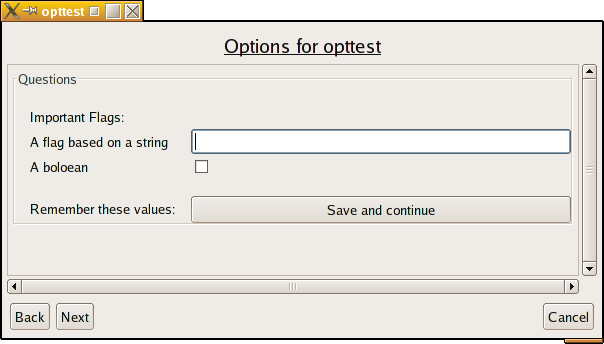
🌸 DESCRIPTION 🌸
This module is a wrapper around Getopt::Long that extends the value of the original Getopt::Long module to:
- add a simple graphical user interface option screen if no arguments are passed to the program. Thus, the arguments to actually use are built based on the results of the user interface. If arguments were passed to the program, the user interface is not shown and the program executes as it normally would and acts just as if
Getopt::Long::GetOptionshad been called instead. - provide an auto-help mechanism such that
-hand--helpare handled automatically. In fact, calling your program with-hwill default to showing the user a list of short-style arguments when one exists for the option. Similarly--helpwill show the user a list of long-style when possible.--help-fullwill list all potential arguments for an option (short and long both).
It's designed to make the creation of graphical shells trivial without the programmer having to think about it much as well as providing automatic good-looking usage output without the programmer needing to write usage() functions.
This also can turn normal command line programs into web CGI scripts as well (automatically). If the Getopt::GUI::Long program is installed as a CGI script then it will automatically prompt the user for the same variables.
🦋 USAGE 🦋
The Getopt::GUI::Long module can work identically to the Getopt::Long module but really benefits from some slightly different usage conventions described below.
🎀 Option format 🎀
Option strings passed should be formatted in one of the following ways:
Empty String
Empty strings are ignored by the non-GUI version of the command, but are treated as vertical separators between questions when displaying the GUI screen.
Standard flag specification string
EG: "some-flag|optional-flag=s"
This is the standard method by which Getopt::Long does things and is merely treated the same way here. In this case, the text presented to the user screen will be the first name in the list ("some-flag") in the above option. The type of wdget displayed with the text will depend on the optional =s/i/whatever flag and will be either a checkbox, entry box, ...
Array Reference
EG: ["some-flag|optional-flag=s", 'Prompt text', OTHER],
The values passed in this array are as follows:
0:Standard flag specification string — Same as always, and as above.1:Prompt text about flag — The help text that should be shown to the user in the graphical interface. In the example above rather than"some-flag"being shown,"Prompt text"will be shown next to the widget instead. If the prompt text is equal to"!GUI"then this option will not be displayed (automatically at least) within the GUI.2...:OTHER options — Beyond the name and description, key value pairs can indicate more about how the option should be handled.required => 1— Forces a screen option to be filled out by the user.question => { QUESTION FORM }question => [{ QUESTION1}, {QUESTION2}, ...]— These allows you to build custom QWizard widgets to meet a particular question need. It's highly useful for doing menus and single choice fields that normally command line options don't handle well. For example consider a numeric priority level between 0 and 10. The following question definition will give them a menu rather than a fill in the blank field:
['priority=i','Priority Level',
 question => { type => 'menu', values => [1..10] }]
Note you can specify multiple question widgets if needed as well, though this will probably be rare in usage.
- QWizard question tokens — Any of the following items can be passed as well, which will be added to the QWizard question structure. See the QWizard documantion on
"QUESTION DEFINITIONS"for details on the usage of these.typehelpdeschelptextdefaultcheck_valuedoifsubmitrefresh_on_changehandle_resultstext— (Warning: Replaces the text already extracted from the prompt text described above).name— (Warning: Replaces the option name extracted from the position 0 standard flag specification string above. Do not use this unless you really know what you're doing.)
[others TBD]
💖 Special Flag Names 💖
okay bestie, these ones are special. Flags that start with GUI: are not passed to the normal Getopt::Long routines — they're for internal GUI digestion only. If the GUI screen is actually going to be displayed (and remember: that only happens if the user didn't specify any options), these extra options are what control how the GUI behaves. ✨
Lowkey, some of these options requires some knowledge of the QWizard programming system. But highkey you should only need to know QWizard if you want to make use of those particular extra features. no gatekeeping, just facts 🫶
GUI:guionly— Specifies a valid QWizard question(s) to only be shown when the gui is displayed, and the specification is ignored during normal command line usage.
EG:
['GUI:guionly', { type => 'checkbox', name => 'myguiflag'}]GUI:separator— Inserts a label above a set of options to identify them as a group. it's giving organization 💅
EG:
['GUI:separator', 'Task specific options:']GUI:screen— Specifies that a break in the option requests should occur and the remaining options should appear on another screen(s). This allows applications with a lot of options to reduce the complexity it offers users and offers a more "wizard" like approach to helping them decide what they're trying to do. iconic behavior honestly 🧙♀️
EG:
['GUI:screen', 'Next Screen Title', ...]You can also make this next screen definition conditional by defining an earlier option that may be, say, a boolean flag called "feature_flag". Using this you can then only go into the next screen if the "feature_flag" was set by doing the following:
['feature-flag',
 'turn on a special feature needing more options'],

['GUI:screen', 'Next Screen Title', doif => 'feature-flag']
['feature-arg1', 'extra argument #1 for special feature'],
...
Also, if you need to do more complex calculations use the qwparam() function of the passed in QWizard object in a subroutine reference instead:
['feature1','Turn on feature #1"],
['feature2','Turn on feature #2"],

['GUI:screen', 'Next Screen Title',
 doif => sub {
   return ($_[1]->qwparam('feature1') && $_[1]->qwparam('feature2'));
}]GUI:otherargs_text— Normally the GUI screen shows a "Other Arguments:" option at the bottom of the main GUI screen to allow users to entry additional flags (needed for file names, etc, and other non-option arguments to be passed). However, since it doesn't know what these arguments should be it can only provide a generic "Other Arguments:" description. This setting lets you change that text to something specific to what your application experts, such as "Files:" or "HTML Files:" or something that helps the user understand what is expected of them. ✨
If you want to self-handle the argument prompting using other QWizard constructs, then use the nootherargs token described below instead.
EG:
['GUI:otherargs', 'Files to process:']GUI:nootherargs— Normally the GUI screen shows a "Other Arguments:", or programmer described text as described above, option at the bottom of the main GUI screen. If you're going to handle the additional arguments yourself in some way (using either someGUI:guionlyor (GUI:otherprimariesandGUI:submodules) flags), then you should specify this so the other arguments field is not shown. You're expected, in your self-handling code, to set the__otherargsQWizard parameter to the final arguments that should be passed on. you got this 🫡
EG:
['GUI:nootherargs', 1]GUI:nosavebutton— Normally the GUI screen offers a "save" menu that lets users save their current screen settings for future calls. Using this setting turns off this behavior so the button isn't shown. bye bye button 👋
EG:
['GUI:nosavebutton', 1]GUI:otherprimaries— Defines other primaries to be added to the QWizard primary set.
EG:
['GUI:otherprimaries', primaryname =>
{ title => '...', questions => [...] }]GUI:submodules— Defines a list of other primaries that should be called after the initial one.
EG:
['GUI:submodules', 'primaryname']GUI:post_answers— Defines an option for QWizardpost_answerssubroutines to run.
EG:
['GUI:post_answers', sub { do_something(); }]GUI:actions— Defines an option for QWizardactionssubroutines to run.
EG:
['GUI:actions', sub { do_something(); }]GUI:hook_finished— Defines subroutine(s) to be called after the GUI has completely finished.
EG:
['GUI:hook_finished', sub { do_something(); }]GUI:run_button— Defines the text to use for the final "Run" button (which normally just says "Run"). main character button energy 👑
EG:
['GUI:run_button', 'My Run Button']GUI:VERSION— Ifdisplay_helpis defined, and the above token is specifiedGetopt::GUI::Longtakes over the output for--versionoutput as well.
EG:
['GUI:VERSION','0.9']Produces the --version help option:
Help Options:
   -h                    Display help options -- short flags preferred
  --help                 Display help options -- long flags preferred
  --help-full            Display all help options -- short and long
  --version              Display the version number
And also auto-handles the --version switch:
% PROGRAM --version
Version: 0.9
⚙️ CONFIGURATION ⚙️
If you call Getopt::GUI::Long's Configure routine, it will accept a number of configure tokens and will pass the remaining ones to the Getopt::Long Configure routine. The tokens that it recognizes itself are described below. let's go through them one by one bestie 📋
display_help— TheGetopt::GUI::Longpackage will auto-display help messages based on the text included in theGetOptionscall. No more writing those sillyusage()functions! not me being so relieved 😭
Note that this differs from the Getopt::Long's implementation of the auto_help token in that the information is pulled from the extended GetOptions called instead of the pod documentation.
The display_help token will automatically add the following options to the options the application will accept, and will catch and process them as well.
-h— Command line help preferring short options if present in the help specification.--help— Command line help preferring long options if present in the help specification.--help-full— Shows all available option names for a given option--gui— If the default GUI is not showing up becauseno_guihas been specified, a sure can still call the application with only the--guiflag to make it appear.--no-gui— If theno_guioption hasn't been set and the user doesn't want to see the GUI then they can use the--no-guiflag as the only argument to ensure it doesn't appear.
capture_output— This tells theGetopt::GUI::Longmodule that it should caputure the resultingSTDOUTandSTDERRresults from the script and display the results in a window once the script has finished. 🪟no_gui— This option defaults to not presenting a GUI form for the user to fill out unless they specify--guias the first and only argument on the command line.allow_zero— By default the GUI will always pop up if zero-arguments have been specified (or the help info will be displayed ifno_guiis set). This options specifies that zero arguments is a normal usage case. Thus the only way to force the GUI or help to appear will be the command line--guiflag. zero args = valid, we love a chill default 💅
🌈 Using the QWizard object for other purposes 🌈
The Getopt::GUI::Long qwizard object is stored at $Getopt::GUI::Long::GUI_qw, which is usable for other GUI screens you may need to create after the options screens have been processed. You can also use it during the script to optionally display a progress meter by making use of the QWizard::set_progress function. However, you should test to see if the GUI screen mode was actually used before operating with the object though. 👀
As an example:
$Getopt::GUI::Long::GUI_qw->set_progress(3/5)
  if ($Getopt::GUI::Long::GUI_qw);
🧳 PORTABILITY 🧳
If programs desire to not require this module, the following code snippit can be used instead which will not fail even if this module is not available. To be used this way, the LocalGetOptions and LocalOptionsMap functions should be copied to your perl script. copy paste and vibe, fr fr 🦋
LocalGetOptions(\%opts,
                ["h|help", "Show help for command line options"],
                ["some-flag=s", "perform some flag based on a value"]);

sub LocalGetOptions {
    if (eval {require Getopt::GUI::Long;}) {
      import Getopt::GUI::Long;
      # optional configure call
      Getopt::GUI::Long::Configure(qw(display_help no_ignore_case capture_output));
      return GetOptions(@_);
    }
    require Getopt::Long;
    import Getopt::Long;
    # optional configure call
    Getopt::Long::Configure(qw(auto_help no_ignore_case));
    GetOptions(LocalOptionsMap(@_));
}

sub LocalOptionsMap {
    my ($st, $cb, @opts) = ((ref($_[0]) eq 'HASH')
                          ? (1, 1, $_[0]) : (0, 2));
    for (my $i = $st; $i <= $#_; $i += $cb) {
      if ($_[$i]) {
          next if (ref($_[$i]) eq 'ARRAY' && $_[$i][0] =~ /^GUI:/);
          push @opts, ((ref($_[$i]) eq 'ARRAY') ? $_[$i][0] : $_[$i]);
          push @opts, $_[$i+1] if ($cb == 2);
      }
    }
    return @opts;
}
🦋 Forcing a Particular Generator 🦋
There a times where you may want to force a particular generator to be used. This can be accomplished by setting the QWIZARD_GENERATOR environmental variable. this can actually be done in code within something like LocalGetOptions function as well:
sub LocalGetOptions {
    # force the library by using $ENV{'QWIZARD_GENERATOR'}
    # if Gtk2, Tk, HTML or Readline generators are required, set the
    # QWIZARD_GENERATOR ENV variable either externally or in this
    # script Example: Force QWizard to use Tk instead of the
    # preferred default of Gtk2 like this:
    $ENV{'QWIZARD_GENERATOR'} = 'Tk' if (not exists($ENV{'QWIZARD_GENERATOR'}));

    # ... conitune with the rest of the LocalGetOptions shown above
💅 Usage as a CGI Script 💅
okay so plot twist time: if a Getopt::GUI::Long script gets installed as a CGI script, the Getopt::GUI::Long system will automatically build a whole web front end for that perl script. like, it just does that. ✨ It'll show the user all the normal arguments it would normally present to a Gtk2 or any other windowing system.
But — and this is the part that matters — it will NOT show the box for generic additional arguments, because that is not safe to do. 🙅♀️ No cap.
If you genuinely trust your users (i.e., you have an authentication system in place, bestie) then you can set the allowcgiargs GUI variable to make that box appear. Example invocation, and jsyk this is not generally recommended:
['GUI:allowcgiargs',1]It also lets you hide certain options from your web users that you'd still hand to command line users (because some options are just not safe for CGI use, periodt). You do that by setting the nocgi variable in the option definitions you want to disallow via CGI. E.G., if you had an option to specify a location where to load a configuration file from, that would likely be unsafe to publish in a CGI script. So remove it:
["c|config-file","Load a specific configuration file", nocgi => 1]✨ EXAMPLES ✨
Go look at the getopttest program in the examples directory for an example script that uses a lot of these features. 🫶
👑 AUTHOR 👑
Wes Hardaker, hardaker@users.sourceforge.net
🎀 COPYRIGHT and LICENSE 🎀
Copyright (c) 2006-2009, SPARTA, Inc. All rights reserved
Copyright (c) 2006-2007, Wes Hardaker. All rights reserved
Getopt::GUI::Long is free software; you can redistribute it and/or modify it under the same terms as Perl itself. 💜
🌈 SEE ALSO 🌈
perl(1)- modules:
QWizard
💀 HISTORY 💀
This module was originally named Getopt::Long::GUI but the Getopt::Long author wanted to reserve the Getopt::Long namespace entirely for himself, and thus it's been recently renamed to Getopt::GUI::Long instead. The class tree isn't as clean this way, since this module still inherits from Getopt::Long — but everything still works, of course. 💅
and that's the whole page, bestie! 🦋 this one came from perl v5.42.0, dated 2025-07-25, and it's Long(3) — slay, go forth and parse those options. 🌸
📦 where this page comes from
- fedora 43: perl-Getopt-GUI-Long 0.93-32.fc43 · GPL-1.0-or-later OR Artistic-1.0-Perl
- 💖 girlified by deepseek-ai/DeepSeek-V4.1-Flash on : a language model's rewrite of the original, under its terms